MediQuest v1.0 System: Online Vital: Stable © 2026

LRTI Antibiotic Hierarchy
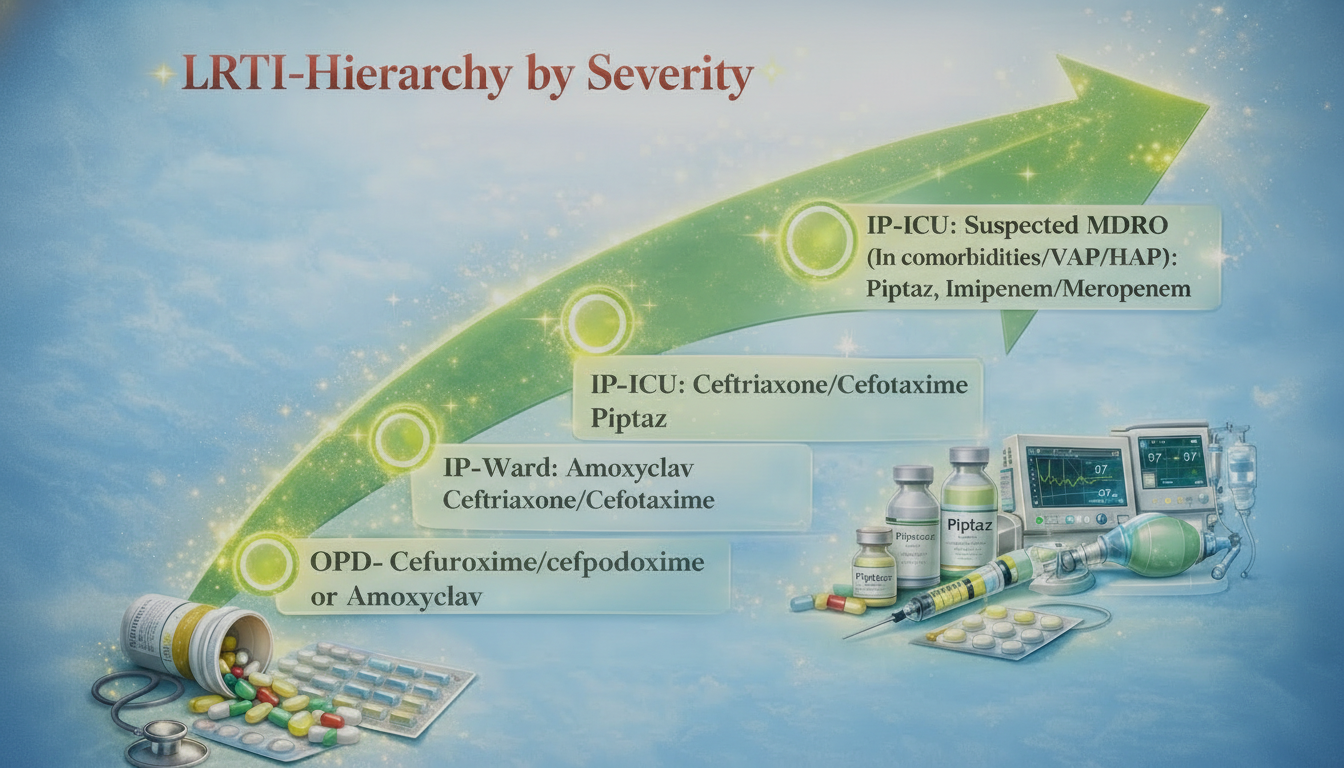
LRTI Hierarchy by Severity showing antibiotic escalation from OPD to IP-ICU

Objective of the game is to understand the use of different antibiotics based on severity of Lower respiratory tract infections, such that unnecessary higher antibiotics are not used in milder infections and use appropriate higher antibiotics in severe case, such that there is a balance between the good clinical outcome and prevention of antimicrobial resistance. Carefully look at the picture, which shows the antibiotics used for treatment of LRTI based on severity as per latest ICMR guidelines. Use this information to play the bling ring game.

Hear Dr. TAG AI explains the hierarchy
Hello! Let me guide you through Bling Ring 👋
Dr. Medix
Dr. TAG AI — Clinical Educator
How to Play
Bling Ring
Game Guide
1
Start the Game — Click Start Game, then hit the Pop Clinical Setting button to begin the timer.
2
Pop Clinical Setting — Click Pop Clinical Setting. Each click reveals one clinical setting. Drag each one to its correct ghost slot - Clinical Settings must be arranged in order from least to most severe. When placed correctly it shows GREEN, when placed wrong it shows RED.
3
Unlock Antibiotics — Once all 4 clinical settings are correctly placed, the Pop Antibiotics button unlocks. Click it to reveal antibiotics one at a time.
4
Place Antibiotics — Drag each antibiotic circle into the correct zone on the Venn diagram. Figure out which ring or overlap zone each antibiotic belongs to! When placed correctly it shows GREEN, when placed wrong it shows RED and stays RED until moved to the correct zone.
5
Score Board — A scoreboard tracks your performance — each correct answer adds 10 points and each incorrect answer deducts 10 points. Bonus points are awarded for faster completion under: 1 min +100, 2 min +50, 3 min +30, 4 min +20, 5 min +10.
6
Win! — All antibiotics correctly placed - Puzzle Solved! Your time is recorded. Hit Restart to play again and beat your best time & Score.
🔊 Hear Dr. Medix explain the game
Bling Ring 💉
00:00
Score 0
Now loading antibiotic
drag it into the correct ring
🔬 ⚕️ 💊 🩺
BLING RING
Arrange Clinical Setting by severity,
then match each with the correct antibiotics.
Timer begins on Pop Clinical Setting
🏥
Pop Clinical Setting
Click the Pop Clinical Setting button 4 times to reveal each clinical setting onto the board.
👆 Click 4 times